What I Learned Rebuilding My Personal Portfolio with GitHub Pages
Published on September 20, 2026
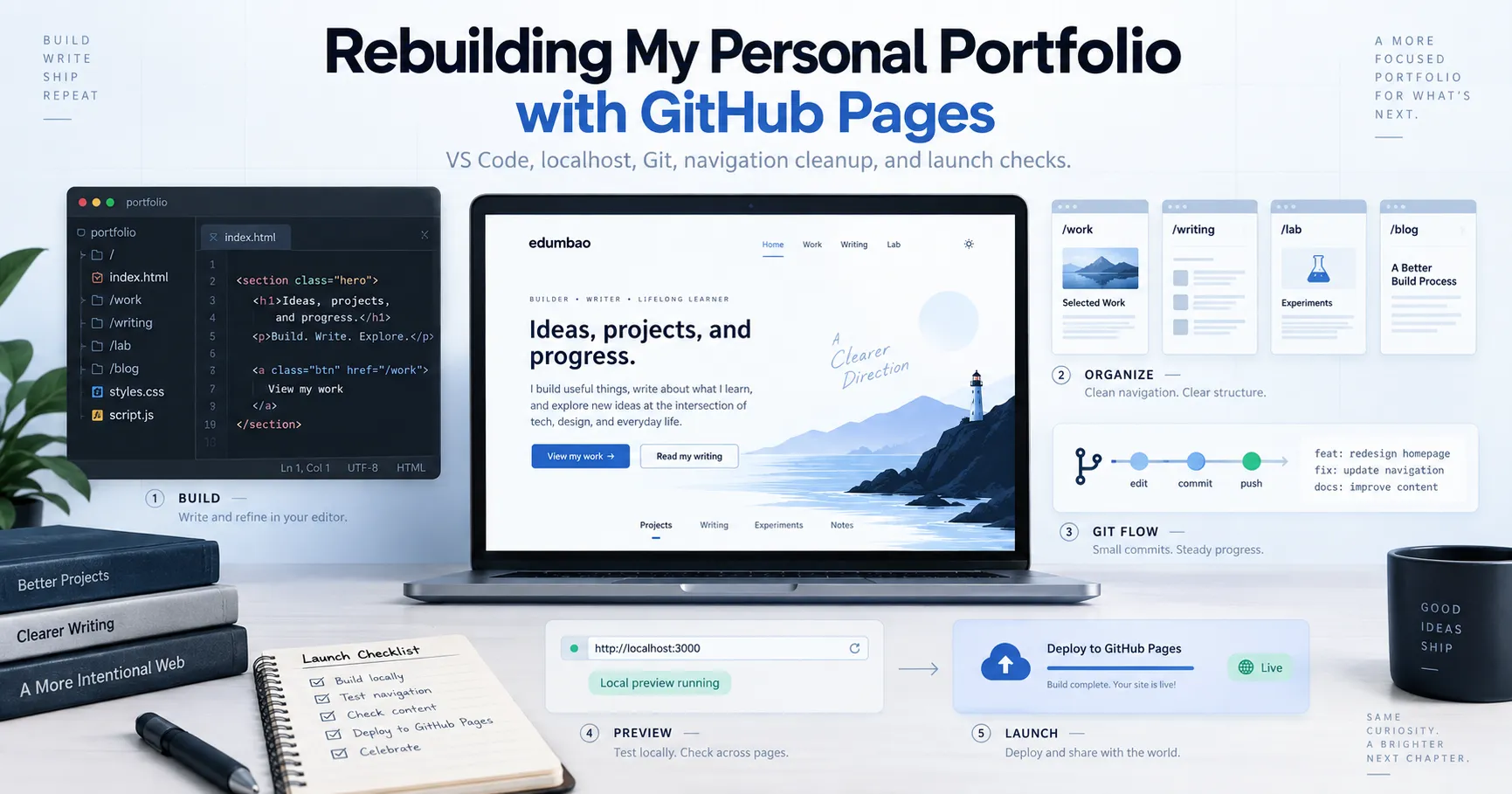
I recently rebuilt edumbao.com, but I did not approach it as a developer trying to create the most technically impressive portfolio possible.
I approached it as a content writer who wanted to understand more of the technical work behind the websites, tools, and workflows I write about.
The project started as a redesign.
It quickly turned into a hands-on lesson in Git branches, GitHub Pages, HTML, CSS, redirects, metadata, responsive layouts, testing, and what it actually means to move a new version of a website into production.
I made mistakes along the way. Some links broke. Some pages used old navigation. I ran into character-encoding problems. I created inconsistent layouts between pages. At several points, a change looked correct in the file but did not appear in localhost.
That was exactly why the project became useful.
1. What I tried
My original goal was simple: redesign my personal website so it better reflected where I am now.
The old version mostly presented my SEO and content work.
I wanted the new version to show three different parts of what I do:
- Work for professional SEO, content, and technical writing.
- Lab for small tools and technical experiments.
- Writing for learning notes, tutorials, and reflections.
I also wanted to keep the site simple enough that I could understand how it worked.
The site is hosted through GitHub Pages, so I worked directly in my existing repository:
edumbao.github.ioInstead of redesigning the live site directly, I created a separate branch:
site-v2
That became the working version of the redesign while
main continued to represent the live website.
From there, the project expanded into several smaller tasks.
I moved the homepage CSS into a shared stylesheet. I added dark and light modes. I rebuilt the navigation. I created a dedicated Lab section and project case studies.
I also created a Work hub, recovered and redesigned my old Writing
Portfolio, and changed my old blog.html page into a
redirect to a cleaner Writing section:
/writing/By the end of the project, the website structure looked more like this:
/
├── lab/
├── work/
├── writing/
├── writing-portfolio/
├── posts/
├── images/
├── assets/css/
├── 404.html
├── robots.txt
└── sitemap.xml
2. Why I tried it
The redesign was partly about presentation, but the bigger reason was technical learning.
As a content writer, I regularly work around websites, SEO metadata, internal links, analytics, APIs, product documentation, technical tutorials, and structured content.
I understand many of those things from the content side. I wanted to understand more of what happens underneath them.
For example, it is easy to tell someone that a website needs clean navigation.
It is different when you change the navigation yourself and discover that several pages all use slightly different markup.
It is also easy to recommend redirects.
It became more concrete when I actually moved:
/blog.htmlto:
/writing/and then had to decide what should happen to the old URL.
This project gave me a small environment where I could practice those ideas without pretending I was building a complex software product.
3. What worked
The biggest thing that worked was using a separate Git branch.
Instead of modifying the live site directly, I could keep working on:
site-v2until I was comfortable with the result.
That gave me room to make mistakes without immediately affecting the live website.
I also started making small Git checkpoints throughout the project.
Some of those commits included:
Move homepage styles to shared stylesheet
Add dark and light theme support
Redesign portfolio header and hero
Add dedicated experiments lab
Add professional work hub
Add redesigned writing portfolio
Add Writing hub and clean site navigation
Redesign writing posts for site v2
Those checkpoints made the project easier to reason about.
Instead of thinking about the redesign as one huge change, I could see it as a sequence of smaller decisions.
Another thing that worked well was testing everything through localhost before pushing changes.
I used:
python -m http.server 8000 --directory C:\Dev\Projects\edumbao.github.ioand checked the site at:
http://localhost:8000/That became part of the workflow.
I could change a file in VS Code, save it, refresh localhost, and see what actually happened.
Toward the end, I also tested desktop layouts, mobile layouts, tablet layouts, dark mode, light mode, navigation, redirects, internal links, article readability, and horizontal overflow.
One simple browser check I found useful was:
document.documentElement.scrollWidth > document.documentElement.clientWidthIf it returned:
falsethe page did not have horizontal overflow.
4. What broke or confused me
File encoding caused strange characters
At one point, characters such as arrows and middle dots appeared incorrectly in PowerShell.
The files themselves were not always broken. Sometimes PowerShell was displaying UTF-8 content differently than expected.
That taught me to be more careful about how I read and write files from PowerShell.
I started explicitly using UTF-8:
$utf8 = New-Object System.Text.UTF8Encoding($false)together with:
[System.IO.File]::ReadAllText(...)
[System.IO.File]::WriteAllText(...)
instead of casually rewriting files with commands that could change their encoding.
Localhost sometimes appeared to ignore my changes
There were moments when I edited the correct file but the browser still showed an older version.
That forced me to check three things:
- Was I editing the correct repository?
- Was the local server running from the correct directory?
- Was the browser showing a cached version?
I eventually started launching the server with an explicit directory:
python -m http.server 8000 --directory C:\Dev\Projects\edumbao.github.ioThat removed one source of confusion.
Navigation drifted between pages
The site evolved gradually, so not every page had the same navigation.
Some older pages still had:
Home | Blog | Tools | Services | Proof | Processwhile the new site had become:
Lab | Work | Writing | About | GitHubThe old post pages were especially easy to forget.
I eventually ran audits across all HTML files instead of checking pages manually one at a time.
That exposed links to sections I had already removed, including:
#services
#proof
#process
The Writing section created a URL decision
My old site used:
/blog.htmlbut the new architecture used folder-based URLs such as:
/lab/
/work/
I decided the Writing section should follow the same pattern:
/writing/
Instead of deleting blog.html, I kept it as a redirect.
That let the new site use a cleaner URL without immediately breaking the old one.
Small visual problems were easier to miss
The homepage portrait looked fine on desktop but was left-aligned on mobile and tablet.
The cause was not the image itself.
It came from responsive CSS such as:
justify-self: start;Changing the tablet and mobile rules to:
justify-self: center;fixed it without changing the desktop layout.
That was a useful reminder that responsive problems are often caused by layout rules rather than the asset itself.
5. What I learned
The main lesson was that website work is often less about writing code from scratch and more about managing a lot of small dependencies.
Changing one navigation label affected the homepage, Lab, Work, Writing, Writing Portfolio, individual project pages, and individual articles.
Moving one page affected links, redirects, canonical URLs, sitemap entries, and social metadata.
Changing the design affected shared CSS, desktop layouts, mobile layouts, article readability, dark mode, and light mode.
I also learned why Git branches matter.
Before this project, it would have been easy for me to think of a branch as just another Git concept to memorize.
Using site-v2 made the benefit concrete.
I could redesign freely while keeping main untouched.
When the site was ready, I compared the two branches:
git diff --stat origin/main..site-v2and:
git diff --name-status origin/main..site-v2Before merging, I also created a safety tag:
git tag pre-v2-launch-2026-09-20Then I merged:
git merge --no-ff site-v2 -m "Merge site v2 redesign"
and only pushed main after testing the merged version
locally.
That workflow made much more sense after actually using it.
6. How this connects to SEO, content writing, APIs, and documentation
Internal linking is a technical problem too
I spend a lot of time thinking about internal links from an SEO perspective.
During this rebuild, I had to think about them as a site-maintenance problem.
When sections disappeared or URLs changed, I needed to audit links rather than assume everything was still valid.
It is the same problem at a different layer.
Metadata needs to match the actual site
The old homepage metadata still described me mainly around SEO and content systems for lean B2B SaaS teams.
The redesigned site had become broader.
It now included technical writing, learning projects, GitHub experiments, and a Lab.
So I updated the title and descriptions to reflect what the site had actually become.
Documentation becomes more useful when it follows real work
The Lab project pages now follow a structure I want to keep using:
- What I tried
- Why I tried it
- What worked
- What broke or confused me
- What I learned
- How it connects to my work
- What I will try next
That structure is simple, but it forces me to document the process honestly.
It also gives me a way to turn technical learning into writing samples without pretending every experiment was a success.
Publishing is part of the technical workflow
By the end of the rebuild, the site included:
404.html
robots.txt
sitemap.xml
I also added social preview metadata with:
og:image
twitter:card
twitter:image
None of those pieces are especially advanced by themselves.
Together, they helped me understand how a content page becomes part of a real website rather than just an HTML file.
7. What I will try next
For now, I do not want to keep redesigning the site.
The goal was to create a stable home for the next stage of my learning, and I think the new structure does that.
The next step is to use it.
I want to keep adding small projects to the Lab.
I want to document more of the technical work I am learning around GitHub, APIs, automation, SEO tooling, data workflows, and technical documentation.
I also want to keep improving the site gradually instead of rebuilding it every time I learn something new.
There are still lower-priority things I could change later.
For example, the individual article URLs still live under:
/posts/while the Writing hub lives under:
/writing/I could eventually migrate those URLs.
But they work today, so I am leaving them alone for now.
That may be one of the more useful lessons from this project.
Learning technical work does not mean changing everything at once.
Sometimes the better decision is knowing what is working well enough, documenting what you learned, and moving on to the next problem.
Explore the rest of the project
I am documenting these projects as I learn more about the technical side of content work.
You can explore the current experiments in Ed's Lab, browse my professional work, or read more of my learning notes.