I Took an Unfinished AI-Generated App From Grok Build to GitHub and Vercel
Published on September 24, 2026
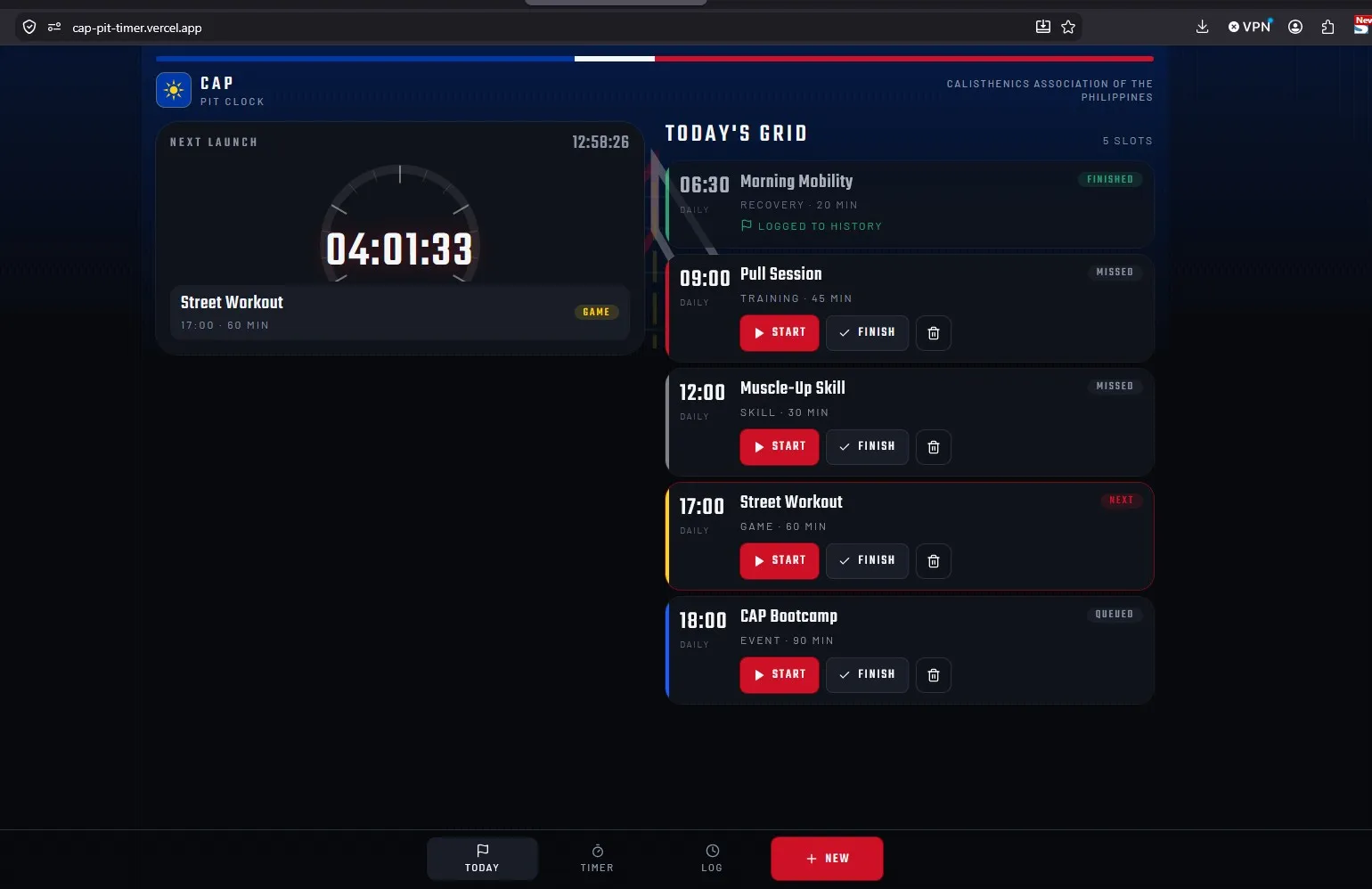
I recently tested Grok Build with a simple idea: create a time-tracking alarm clock for the Calisthenics Association of the Philippines.
I wanted athletes to be able to manage training schedules, create alarms, track activity time, and review completed sessions. I also asked for a mobile-first interface inspired by a futuristic racing-game dashboard.
Grok generated something more complete than I expected, but the build stopped before the project was really mine.
What I had was a ZIP file containing an unfamiliar codebase.
That became the more useful part of the experiment.
1. What I tried
My first goal was not to add more features.
I wanted to answer a simpler question:
Could I take an unfinished AI-generated project, understand enough of it to run it myself, and move it into a normal GitHub and Vercel workflow?
The exported project turned out to be a mobile-first web application built with React, TypeScript, Vite, TanStack Start, Tailwind CSS, Zustand, and Nitro/Vercel tooling.
It was not a native Android or iOS app.
That distinction mattered because my original prompt described the product clearly, but it did not define the technical architecture. Grok chose the implementation.
I moved the exported project into:
C:\Dev\Projects\cap-pit-timerFrom there, I started treating the generated code as a project I needed to inspect rather than something I could simply upload and trust.
2. Why I tried it
As a content writer learning GitHub, coding, APIs, automation, and technical workflows, I am interested in what happens after AI produces code.
Generating an application is becoming easier.
Taking responsibility for what was generated is a different problem.
I wanted to learn how to ask practical questions about an unfamiliar project:
- What framework did the AI choose?
- Can the project run outside the original builder?
- Are there secrets or environment files I should not commit?
- Which files actually belong in GitHub?
- Which files are only there for the builder platform?
- Do the tests really run on my machine?
- Can the project build and deploy somewhere else?
Those questions became the real project.
3. What worked
The first good sign was that the ZIP contained a real application rather than just mockups.
I created a normal environment setup with:
VITE_AUTH_ENABLED=falseI renamed the npm package to:
cap-pit-timerThen I installed the dependencies with:
npm ciThat installed 418 packages and reported zero vulnerabilities.
The application did not start immediately.
Grok's original development command used a custom wrapper that tried to launch Vite. On my Windows machine, it failed with:
spawn vite ENOENTThe problem was not the whole application. It was the wrapper around Vite.
I changed the development command to run Vite normally:
vite dev --host 0.0.0.0 --port 8080After that:
npm run devworked, and the application loaded at:
http://localhost:8080/The dashboard appeared correctly. I could create alarms, start and stop timers, and see completed activities in the history.
I also ran:
npm run typecheck
npm test
npm run lint
npm run build
TypeScript passed. The original app test group passed 55 out of 55 tests. Lint reached zero errors, with a few warnings still left to clean up later. The production Vercel/Nitro build also completed successfully.
Once the project was stable locally, I created a Git repository, committed the baseline, and pushed it to:
github.com/edumbao/cap-pit-timer ↗
I then deployed the same project to Vercel:
4. What broke or confused me
A small lint fix turned into a syntax error
One lint error came from an empty catch block inside
client.server.ts.
I tried to fix it manually and accidentally broke the brace structure around the function.
That created a new parsing error:
Parsing error: '}' expectedInstead of continuing to edit individual lines in a file I did not fully understand, I replaced the full file with a corrected version.
That was a useful lesson for me. When I am still learning an unfamiliar codebase, a full replacement I can compare is sometimes safer than making several small edits without understanding the surrounding code.
Passing tests did not mean every test was running
The original test command included:
scripts/**/*.test.mjsOn Windows, that part of the command returned:
tests 0
suites 0
Another test group still ran and passed, so at first the project looked healthier than it really was.
I changed the command temporarily so the remaining script tests could actually run.
That exposed 106 tests:
106 tests
96 passed
10 failed
Two of the failures were Windows symlink-permission errors.
Most of the others were not CAP Pit Timer failures. They were tests expecting Grok-specific behavior such as generic Grok titles, Grok social-card URLs, and Grok PWA behavior.
That helped me separate an application problem from a platform-template problem.
I could not just delete everything named Grok
Once the app was running, I wanted to clean the project.
At first, it was tempting to remove every file containing the word
grok.
That would have broken the application.
Some of those files were still connected to:
- Vite configuration
- PWA metadata
- middleware
- install assets
- preview behavior
- authentication scaffolding
Instead of mass deletion, I started tracing references with:
git --no-pager grep -n -i "grok"and more focused searches such as:
git --no-pager grep -n "grokPwaPlugin"That made the cleanup slower, but much safer.
5. What I learned
The biggest lesson was that an AI-generated project contains more than the application I asked for.
It can also contain:
- preview infrastructure
- authentication scaffolding
- environment wrappers
- database helpers
- platform branding
- internal QA scripts
- generated middleware
- tests built around the original platform
Some of those pieces are useful. Some are temporary. Some become unnecessary once the project leaves the original builder.
I also learned why branches matter in a more practical way.
Before starting the cleanup, I kept the working application on:
mainand created:
cleanup/grok-scaffoldingfor the risky cleanup work.
That meant I could remove generated files and change the build setup
without immediately affecting the stable version deployed from
main.
The cleanup became a series of smaller Git checkpoints instead of one large rewrite.
So far, I have removed Grok workspace instructions, Grok preview tooling, Grok browser QA tooling, and the Grok PWA layer.
The PWA cleanup was the most meaningful change.
The project previously depended on Grok-specific manifest paths, install assets, middleware, and an external Grok script.
I replaced that with a normal project-owned manifest:
public/manifest.webmanifestwith CAP Pit Timer metadata such as:
{
  "name": "CAP Pit Timer",
  "short_name": "CAP Timer",
  "display": "standalone"
}
After removing the Grok PWA system, TypeScript still passed, lint stayed at zero errors, the production build succeeded, and the new manifest loaded correctly on localhost.
6. How this connects to SEO, content writing, APIs, and documentation
Reading code changes how I think about documentation
I normally approach software from the outside.
As a content writer, I think about what a product does, who it is for, how someone uses it, and how it should be explained.
This project forced me to approach those questions from the inside.
I had to trace dependencies, understand configuration files, read test output, compare generated code with application code, and decide which parts of a project belonged to the product and which belonged to the original platform.
That is directly useful for API documentation, developer tutorials, implementation guides, GitHub READMEs, troubleshooting content, and technical case studies.
Metadata and PWA files are part of product content
Replacing the Grok PWA layer also made metadata feel more concrete.
A manifest is not just another technical file. It contains the product name, short name, description, icons, colors, and application behavior when installed.
The root route also controls social metadata and other information that affects how the application is represented outside the app itself.
That connects directly to the work I already do around SEO metadata and content presentation.
Git history can become part of the documentation
I also started seeing commits as a form of project documentation.
Instead of one vague cleanup commit, the branch now records smaller decisions such as:
Remove Grok workspace instructions
Remove Grok preview tooling
Remove Grok browser QA tooling
Replace Grok PWA layer with CAP manifest
Those messages make it easier to understand how the project changed and why.
7. What I will try next
The cleanup is not finished.
There is still generated infrastructure around authentication, environment handling, connector support, and preview behavior that I need to review.
I also want to clean up the remaining lint warnings and make the test setup work more consistently across operating systems.
The larger product question comes later.
CAP Pit Timer is currently a mobile-first web application.
If I want its alarms to behave like real phone alarms when the browser is closed or the device is locked, I will eventually need to look at native mobile capabilities, possibly through React Native or Expo.
I am deliberately not jumping there yet.
My next steps are:
- Finish separating CAP Pit Timer from unnecessary Grok scaffolding.
- Improve the cross-platform test setup.
- Document the current architecture.
- Review which features belong in the MVP.
- Decide whether the next version should remain a PWA or move toward a native mobile app.
The interesting part of this project is no longer that an AI tool generated an app.
It is that I am learning what to do after the generation stops.
Explore the project
You can view the current repository on GitHub ↗ or try the current live Vercel demo ↗ .
I am documenting projects like this as I learn more about the technical side of content work.
You can explore more experiments in Ed's Lab, browse my professional work, or read more learning notes.