
Data-First Programmatic SEO: How to Fix "Crawled - Currently Not Indexed" Without Adding Word Count
Published on November 17, 2026
I helped scale Outscraper to over 700,000 users in 2 years with a 9-person B2B SaaS team and just 3 writers. That constraint left no room to treat programmatic SEO as a writing volume problem.
We could not put a writer on every city, service, or entity page. If those pages were going to be indexed, the uniqueness had to come from the data under the template, not from more copy.
I treat programmatic SEO as a data engineering problem for that reason. The page is a layout for facts that already belong to one entity. The writing supports those facts.
Why bulk templates fail indexation
A frequent build pattern is to generate thousands of URLs from one template and swap a city name, a service name, or a category into otherwise identical paragraphs. The pages look complete in a browser. In Google Search Console, they collect under "Discovered - currently not indexed" or "Crawled - currently not indexed."
Google can crawl a URL and still decline to index it when the page does not add information beyond pages that already exist. If the only change from one URL to the next is a proper noun inside a repeated paragraph, the crawler has little new to record.
Word count does not fix that. Extra generic paragraphs about the local market still leave every page saying the same thing. The indexation problem is a uniqueness problem in the underlying data.
The 40% Unique Benefit Rule
I use a clear threshold before a template is allowed to ship. At least 40% of the visible page content must come from proprietary, calculated, or freshly scraped data that is specific to that exact entity.
On a local or entity page, that data includes:
- City median pricing for the service or product
- Total verified providers in that market
- Local review rankings
- Factual review themes pulled from real reviews
Those fields have to be visible. A number that only lives in a database does not count toward the 40%. Remove the shared intro and the repeated service copy, and a reader should still see a page that could only belong to that entity.
The other 60% can be a stable template: the H1 pattern, the section order, the call to action, and short explanatory copy. The entity data is the reason the page exists.
The 4-step production pipeline
Step 1: 15-minute SERP footprint validation before touching a CMS
Before touching a CMS, I spend 15 minutes on the search results for the target query pattern. I look for data-heavy results: comparison tables, counts, prices, lists of providers, or other entity-specific facts.
If the first page is filled with unique local inventories, a thin template with a city name swap is unlikely to earn indexation. If the results already show a clear data footprint, I document those fields and decide whether we can supply a cleaner version of the same kind of data.
Step 2: Pre-calculating group-level metrics in Python Pandas or Google Sheets QUERY formulas before export
Raw rows are not page-ready. I pre-calculate group-level metrics before anything is exported into the template. In Python Pandas or in Google Sheets QUERY formulas, I compute those entity-specific fields at the group the page will represent.
The page then receives finished fields. It does not average or rank values at render time. You can inspect the export and confirm a city is distinct from its neighbors before a URL goes live.
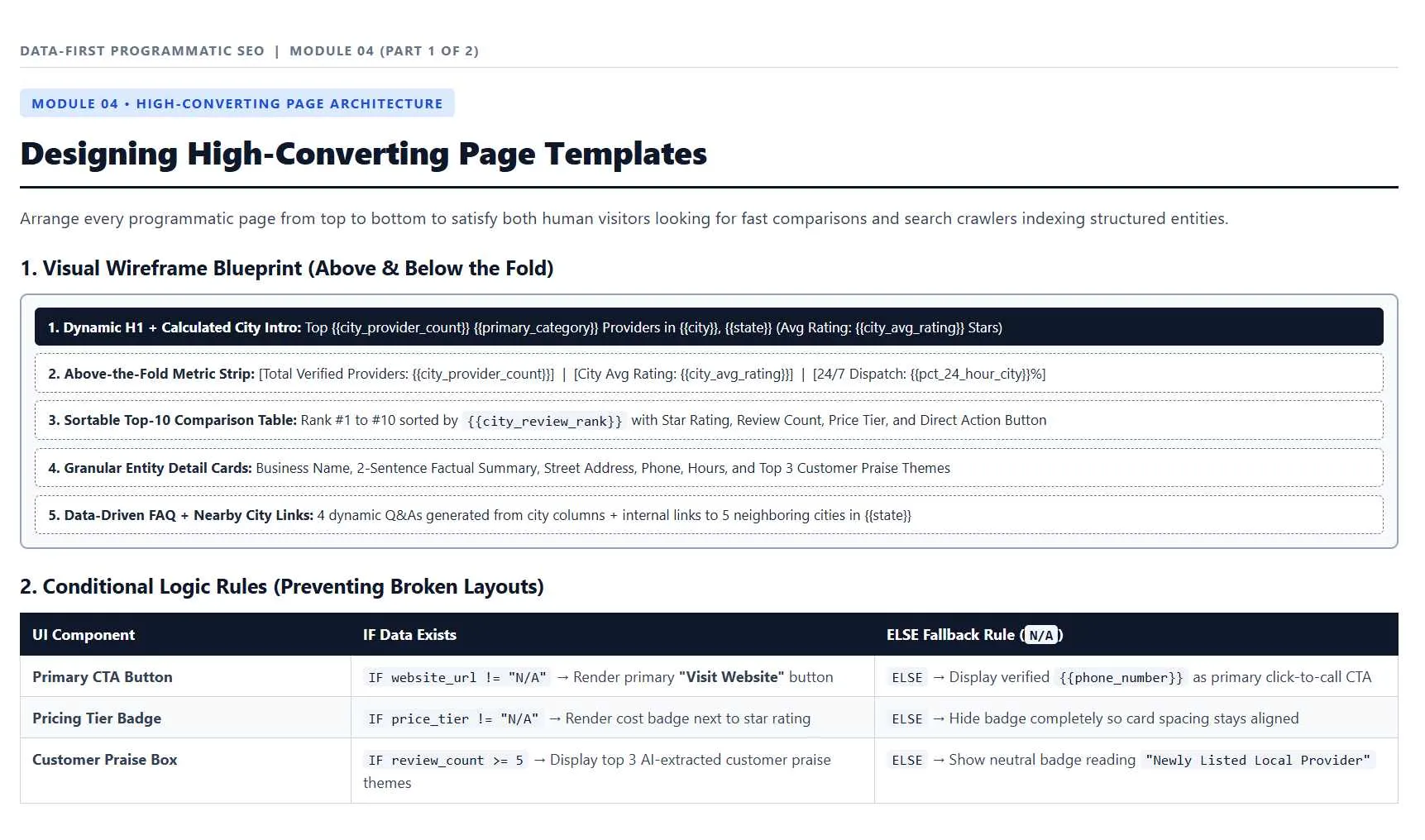
Step 3: Conditional fallback rules so missing cells in raw scraped CSVs never render broken blanks
Scraped CSVs have gaps. A missing price, a blank review count, or an empty theme field should never reach the page as an empty box, a "null," or a broken sentence.
I set conditional fallback rules before render. If a cell is missing, the template hides that block, substitutes a pre-approved factual label that does not invent a number, or drops the URL from the current batch until the data is complete. The rule is written once and applied to every row.
Step 4: Controlled weekly drip rollouts (100 to 250 URLs per week) until Search Console indexation passes 80%
I do not publish the full set on day one. I roll out 100 to 250 URLs per week and watch Google Search Console. The batch stays at that pace until indexation for the launched set passes 80%.
A drip lets you catch a template defect or a weak data field in that week's batch. If indexation stays below 80%, I stop the next batch and fix the data or the template first. Only after the launched set clears the threshold do I release the next group.